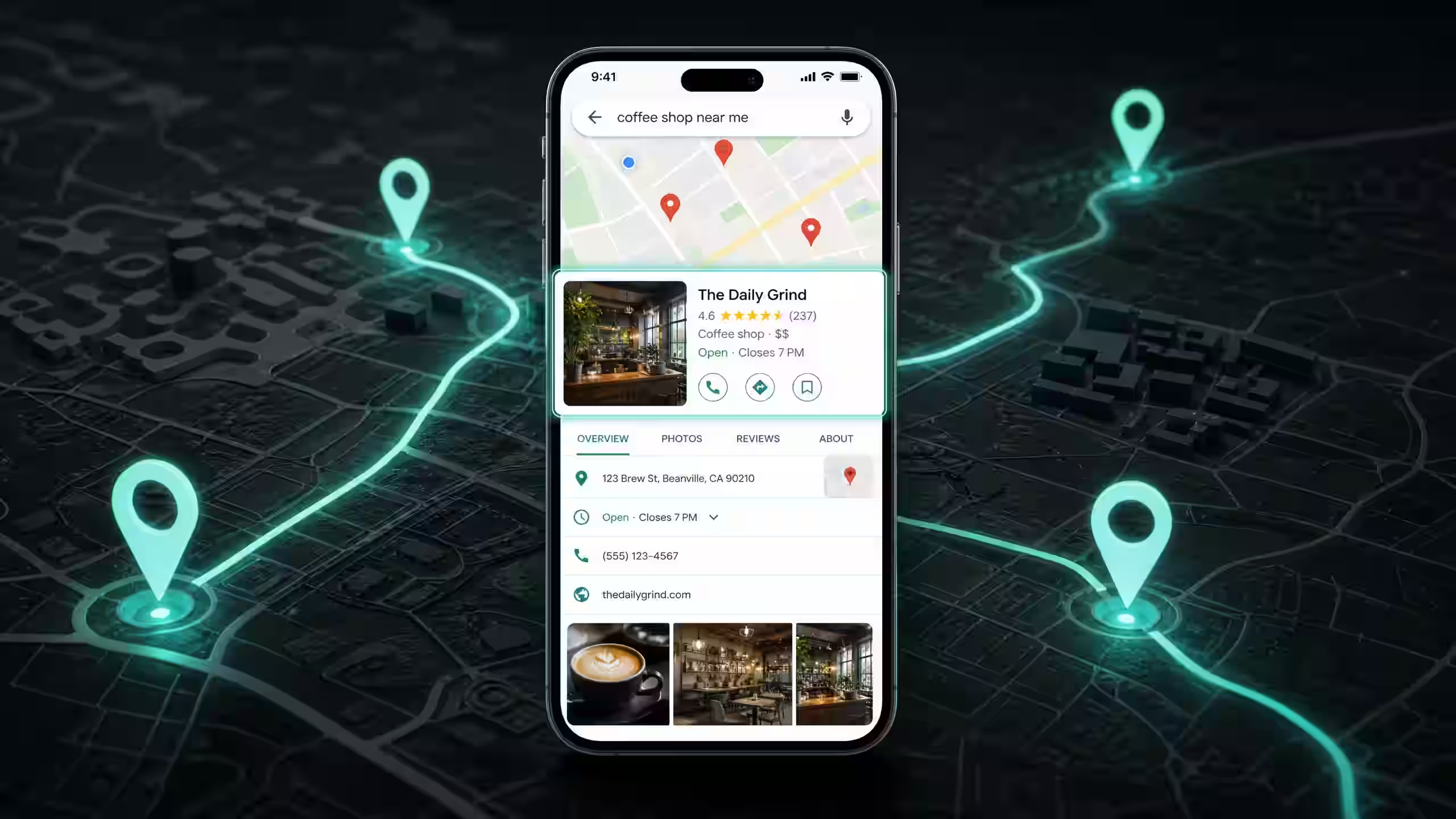
46% of all Google searches have local intent. That means nearly half the people typing something into Google right now are looking for a business near them.
A restaurant. A dentist. A gym. A plumber.
And when those results show up, Google doesn't send them to a website first. It shows them the Local Pack. That's the map with 3 business listings right at the top of the page. The one that captures over 30% of all clicks on local search results.
If your business isn't in that top 3, you're invisible to the people most likely to walk through your door today.
Your Google Business Profile is what controls whether you show up there. And businesses with a complete profile are 2.7x more likely to be considered reputable by potential customers. So this isn't optional. It's the foundation of every local marketing strategy.
I'm going to walk you through exactly how to set up, optimize, and maintain your Google Business Profile. Step by step. No fluff. Just the stuff that actually moves the needle.
What Is Google Business Profile and Why Does It Matter?
Google Business Profile (formerly Google My Business) is a free tool from Google that lets you control how your business appears in Google Search and Google Maps. It shows your hours, address, phone number, reviews, photos, and posts directly in search results.
Think of it as your business's storefront on Google. Before anyone visits your website, they see your GBP listing. And what they see there determines whether they click, call, or keep scrolling.
Here's why it matters so much: 88% of consumers trust online reviews as much as personal recommendations. Your GBP listing is where those reviews live. It's where people check your hours before driving over. It's where they look at your photos to decide if your place looks worth visiting.
If your profile is incomplete, outdated, or has 3 reviews from 2021, you're telling every potential customer that you don't care enough to show up online. And they'll go to the competitor who does.
Step 1: Claim and Verify Your Profile
First things first. Go to business.google.com and search for your business name. If it already exists, claim it. If it doesn't, create a new listing.
Google will need to verify that you actually own the business. They'll typically send a postcard with a verification code to your business address. This takes 5 to 14 days. Some businesses qualify for phone or email verification, which is faster.
Don't skip this step. Until you're verified, you can't respond to reviews, post updates, or control your listing. You're just a name on a map with no one behind the wheel.
Step 2: Complete Every Single Field
This is where most businesses drop the ball. They fill in the name, address, and phone number. Then they stop.
That's like opening a shop and only putting up half the sign.
Here's what you need to fill out completely:
- Business name. Exactly as it appears on your signage. Don't stuff keywords in here. Google will penalize you for it.
- Address. Make sure it matches your website and every other listing online. Inconsistency kills your local ranking.
- Phone number. Use a local number, not a call center line. Google favors local numbers.
- Website URL. Link to your homepage or a location-specific landing page.
- Hours of operation. Include special hours for holidays. Nothing frustrates a customer more than showing up to a closed door when Google said you were open.
- Business description. You get 750 characters. Use them. Describe what you do, who you serve, and what makes you different. Write it for humans, not robots.
- Services or menu. List everything you offer. Google uses this to match your profile to specific searches.
A complete profile doesn't just look more professional. It gives Google more data to match you with the right searches. And that directly impacts whether you show up in the Local Pack.
Step 3: Choose the Right Categories
Your primary category is one of the biggest ranking factors for local search. Get this wrong, and you'll struggle no matter how good the rest of your profile is.
Your primary category should be the most specific description of what your business is. Not what you do. What you are.
If you're a pizza restaurant, your primary category is "Pizza Restaurant." Not "Restaurant." Not "Italian Restaurant." Pizza Restaurant. Be specific.
If you're a family dentist, it's "Dentist." Not "Healthcare Provider." Not "Medical Office."
Then add secondary categories for everything else you offer. A pizza restaurant might add "Italian Restaurant," "Delivery Restaurant," and "Catering Service." A dental clinic might add "Cosmetic Dentist," "Pediatric Dentist," and "Emergency Dental Service."
Google gives you up to 10 categories. Use as many as genuinely apply. But don't add categories that don't match your business. If you're a dentist who doesn't do orthodontics, don't add "Orthodontist." Google checks, and customers will leave bad reviews when they show up expecting something you don't offer.
Step 4: Upload the Right Photos
Profiles with photos get 35% more clicks to their website and 42% more requests for directions. That's not a small difference. That's the difference between someone finding you and someone driving to your competitor.
Here's what to upload:
- Cover photo. The first thing people see. Make it your best shot. For a restaurant, this is your signature dish or your dining room at peak atmosphere. For a healthcare clinic, it's your clean, welcoming reception area.
- Logo. Keep it clean and recognizable at small sizes.
- Interior photos. 3 to 5 shots showing the inside of your business. People want to know what the space looks like before they visit.
- Exterior photos. 2 to 3 shots showing the outside. Help people recognize your building when they arrive.
- Team photos. Show the people behind the business. A smiling team builds trust before anyone walks in.
- Product or service photos. For restaurants, that's your food. For healthcare, that's your treatment rooms or equipment. Show what you actually deliver.
Aim for at least 20 photos total. And keep adding new ones every month. Google treats photo freshness as a quality signal. A profile with photos from 3 years ago looks abandoned.
Use real photos. Not stock images. People can tell the difference in a second, and stock photos destroy trust immediately.
Step 5: Get More Google Reviews (and Respond to All of Them)
Reviews are the single most visible trust signal on your entire profile. And they directly affect your ranking in the Local Pack.
Businesses that rank in the top 3 local results typically have 40+ reviews with an average rating above 4.0. But here's the thing that most people miss: quality and recency matter more than volume. Five recent, detailed 5-star reviews carry more weight than fifty old, one-word reviews.
How to Ask for Reviews Without Being Annoying
Timing is everything. Ask right after a positive experience. A patient just told your receptionist the appointment was great. A diner just said the food was amazing. That's your moment.
Here's the script: "That means a lot to us. Would you mind leaving a quick Google review? It really helps other people find us."
Then make it easy. Create a direct link to your Google review page. Print QR codes on table cards, receipts, or appointment follow-up emails. Remove every possible friction point between the ask and the action.
How to Respond to Positive Reviews
Always respond. Always. Even a simple "Thank you, [name]! We're glad you had a great experience" shows future customers that you're paying attention. Personalize it when you can. Mention something specific they said.
How to Respond to Negative Reviews
This is where most businesses panic. Don't.
A thoughtful response to a negative review actually builds more trust than no negative reviews at all. People know no business is perfect. What they want to see is how you handle problems.
Here's the formula: Acknowledge. Apologize. Offer a solution offline. Keep it short.
"We're sorry about your experience, [name]. That's not the standard we hold ourselves to. We'd love the chance to make it right. Please reach out to us directly at [phone/email]."
Never argue. Never get defensive. Never blame the customer publicly. Every future customer is reading that exchange.
Step 6: Post on Your Google Business Profile Every Week
Most business owners don't even know you can post on Google Business Profile. But you can. And you should.
Google Posts show up directly in your business listing. They keep your profile looking active and fresh. And they give Google another signal that your business is alive and relevant.
What to post:
- Offers and promotions. "20% off all appetizers this Friday." Include a clear call-to-action button.
- Events. "Live music every Saturday night. Reserve your table now."
- Updates. "We just added 3 new dishes to our lunch menu." Or "Dr. Amara is now accepting new patients."
- Tips and advice. A dentist might post "3 signs you need a dental checkup." A restaurant might share a behind-the-scenes prep video.
Aim for 2 to 3 posts per week. Every post should include a photo and a call-to-action button. "Call Now." "Book." "Learn More." "Order Online." Give people a next step.
Posts expire after 7 days in most cases, so you need to keep them coming. Think of it like social media for Google. The businesses that post regularly look active. The ones that don't look closed.
Step 7: Seed Your Q&A Section
There's a Q&A section on every Google Business Profile. Anyone can ask a question. And anyone can answer.
Here's the problem: if you don't seed it yourself, random people will answer questions about your business. Sometimes incorrectly. Sometimes with outdated information.
Take control of it. Think of the 5 to 10 most common questions customers ask you. Then add them to your Q&A section yourself and answer them.
For a restaurant: "Do you take reservations?" "Is there parking nearby?" "Do you have gluten-free options?"
For a healthcare provider: "Do you accept walk-ins?" "What insurance plans do you take?" "How do I book an appointment?"
This does two things. It gives potential customers instant answers. And it gives Google more relevant content to match your profile with search queries. Both help you rank higher and convert more visitors into customers.
The 5 Biggest Google Business Profile Mistakes
I've audited hundreds of GBP listings. These same mistakes show up over and over:
- Incomplete profile. Missing hours, no business description, two photos from 2019. If your profile looks abandoned, people assume your business is too.
- Ignoring reviews. Having 30 reviews and zero responses tells every future customer that you don't care about feedback. Respond to every single one.
- Never posting. A GBP with no posts looks static and outdated. It signals to Google that your business might not be active.
- Wrong categories. Your primary category is one of the top ranking factors. If it's wrong, every other optimization you do is fighting uphill.
- Inconsistent NAP. Your Name, Address, and Phone number need to be identical across your GBP, your website, and every directory listing online. Inconsistencies confuse Google and hurt your ranking.
Fix these 5 things and you'll already be ahead of 80% of local businesses. Most of your competitors haven't bothered.
How GBP Connects to Your Website and Social Media
Your Google Business Profile doesn't exist in a vacuum. It's one piece of your entire online presence. And the pieces need to work together.
Your website should match your GBP. Same business name. Same address. Same phone number. Same hours. If someone finds you on Google Maps and clicks through to your site, the experience should be seamless. Any mismatch creates doubt.
Link your website to your GBP. And add a "Find Us on Google Maps" link or embed on your contact page. This sends relevance signals back to Google.
Social media feeds into GBP too. When someone searches your business name and sees an active Google listing, a professional website, and a thriving Instagram page, you look established. You look real. You look like the obvious choice.
We saw this firsthand with Shaigan Restaurant. When we optimized their GBP alongside their social media and website, the results compounded. Their Google Maps direction requests increased while their Instagram engagement tripled. People were finding them on Google, visiting their Instagram, and then walking in the door. Each channel reinforced the others. You can read the full Shaigan case study here.
And for healthcare providers, this connection matters even more. 82% of patients research providers online before booking. They're checking your Google reviews, then looking at your website, then deciding if they trust you enough to make an appointment. Every touchpoint needs to tell the same story.
Frequently Asked Questions
How long does it take to see results from Google Business Profile optimization?
Most businesses see measurable improvements within 30 to 60 days. This includes more profile views, more direction requests, and more phone calls. Ranking improvements in the Google Maps local pack usually take 60 to 90 days as Google processes optimization signals and new review activity.
How many Google reviews do I need to rank in the local pack?
There's no fixed number, but businesses in the local pack typically have 40+ reviews with an average rating above 4.0. Quality and recency matter more than volume. Five recent, detailed 5-star reviews carry more weight than fifty old, one-word reviews.
Is Google Business Profile free?
Yes. Creating and managing a Google Business Profile is completely free. Google doesn't charge for listings, posts, reviews, or messaging. The cost comes from the time and strategy needed to optimize it properly, which is why many businesses hire a professional GBP management service.
What should I post on my Google Business Profile?
Post promotional offers, event announcements, product or service updates, and industry tips. Posts with high-quality images get 35% more clicks. Aim for 2 to 3 posts per week, and always include a call-to-action button like Call Now, Book, or Learn More.
What To Do Next
You've got two options. Go through this guide step by step and optimize your profile yourself. Or hand it to someone who does this every day.
If you want to do it yourself, start with the basics today. Claim your profile if you haven't. Fill in every field. Upload 10 photos. Ask 5 happy customers for a review this week. That alone will put you ahead of most local competitors.
If you'd rather have a team handle it, here's where to go:
- Google Business Profile Management — We'll optimize, post, manage reviews, and track your rankings. You focus on running your business.
- Book a free strategy call — 30 minutes. We'll audit your current GBP listing and tell you exactly what to fix first.
No pitch. No pressure. Just a straight conversation about what's working and what's not.